









Table of Contents
Introduction
Most teams don’t realize how much time gets lost to a single recurring problem: someone asking a question that’s already been answered somewhere, buried in an old Slack thread, a forgotten Google Doc, or an email nobody can find six months later. Guru knowledge base software was built specifically to fix that particular kind of friction — turning scattered institutional knowledge into something searchable, verified, and actually usable in the moment work is happening.
This guide breaks down what Guru knowledge base software actually does, how it’s different from a standard company wiki, what it typically costs, and how it stacks up against alternatives worth considering.
What Is Guru Knowledge Base Software?
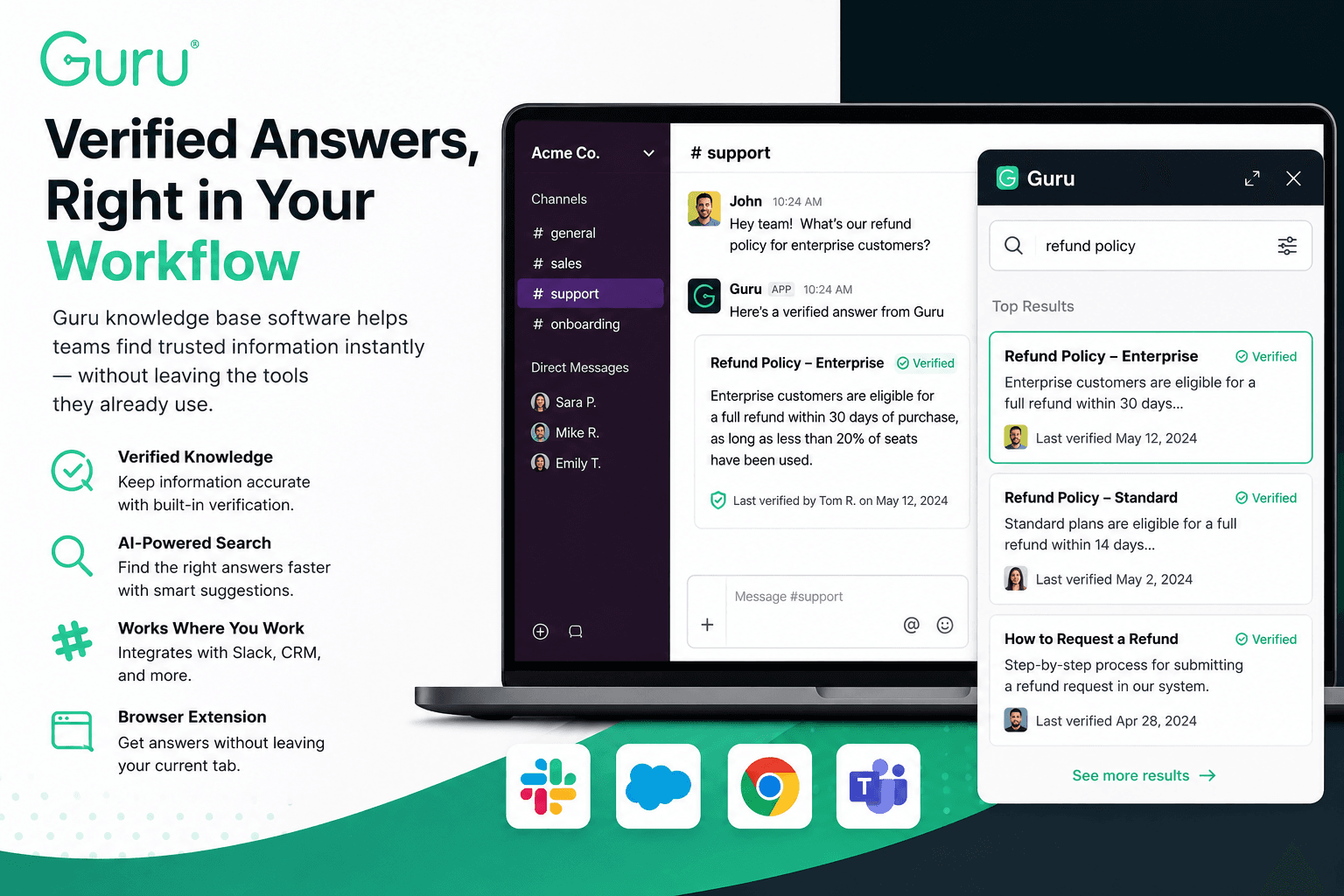
Guru knowledge base software is a knowledge management platform designed to sit inside the tools teams already use — Slack, browser tabs, CRMs, support ticketing systems — rather than existing as a separate destination people have to remember to visit. Instead of asking employees to go dig through a wiki, it surfaces relevant information directly inside the workflow, often through a browser extension or Slack integration.
The core idea behind Guru knowledge base software is “verified knowledge.” Rather than letting documentation quietly go stale the way traditional wikis often do, it includes a built-in verification system that periodically reminds content owners to confirm information is still accurate, flagging anything that hasn’t been reviewed recently.
Where the Name Comes From
The product takes its name from the idea of an always-available expert — a “guru” someone can ask instead of interrupting a colleague or searching through outdated documents. That positioning shows up clearly in how Guru knowledge base software is marketed: less like a static filing cabinet, more like an on-demand answer engine built into daily workflows.
Core Features of Guru Knowledge Base Software
A handful of features tend to come up consistently when comparing this platform to other documentation tools.
Browser Extension and In-App Widget
Rather than requiring a separate tab, the Guru knowledge base software extension overlays relevant information directly inside whatever application someone is already using — a support ticket, a CRM record, or a chat conversation — reducing the number of steps between having a question and finding an answer.
Verification Workflows
Content inside Guru knowledge base software can be assigned an expiration or review cycle. When that period lapses, the system prompts a designated owner to reconfirm accuracy, which helps prevent the slow decay of outdated information that plagues most internal wikis after the first year or two.
AI-Powered Search and Suggestions
More recent versions of the platform have leaned into AI-assisted search, surfacing relevant cards based on natural language queries rather than requiring exact keyword matches, and in some cases suggesting content gaps where documentation doesn’t yet exist.
Slack and Microsoft Teams Integration
Since much of modern workplace communication happens in chat tools, Guru knowledge base software integrates directly with platforms like Slack, letting team members search and pull up verified answers without leaving the conversation they’re already in.
Who Typically Uses Guru Knowledge Base Software
Certain teams get disproportionately more value out of this kind of tool than others.
Customer Support and Success Teams
Support agents dealing with repetitive questions benefit heavily from having verified answers surfaced directly inside their ticketing system, cutting down average response times without sacrificing accuracy.
Sales Teams
Sales reps often need quick access to updated pricing, competitive positioning, or product details mid-conversation. Having that information available inside a CRM rather than requiring a separate search cuts down on lost deals caused by outdated talking points.
Onboarding and HR
New hires ramping up on internal processes tend to ask the same handful of questions repeatedly. Centralizing that information inside Guru knowledge base software reduces the burden on managers and speeds up time-to-productivity for new employees.
Guru Knowledge Base Software vs. a Traditional Wiki
This comparison comes up constantly, since many teams already have some form of internal wiki before considering a switch.
The Core Difference: Verification vs. Static Pages
A traditional wiki tends to accumulate content indefinitely, with no built-in mechanism to flag what’s outdated. Guru knowledge base software addresses this directly through its verification cycle, which is arguably its single biggest differentiator from tools like Confluence or a basic internal wiki.
Workflow Integration vs. a Separate Destination
Traditional wikis generally live as a standalone site employees have to actively visit. Guru knowledge base software is built around minimizing that friction by embedding directly into existing tools, which tends to drive significantly higher day-to-day usage compared to a wiki that requires a deliberate context switch.
For a closer comparison written from a competing platform’s perspective, Bloomfire’s breakdown of what Guru is is worth reading alongside this guide for a fuller picture of how the two platforms differ.
Guru Knowledge Base Software: Pros and Cons
| Pros | Cons |
|---|---|
| Verification system actively prevents outdated content from lingering | Can require real discipline to maintain verification cycles at scale |
| Deep integrations with Slack, Teams, and browser workflows | Pricing scales per user, which adds up quickly for larger teams |
| AI-assisted search reduces reliance on exact keyword matching | Initial content migration from an existing wiki takes real setup time |
| Strong fit for support, sales, and onboarding use cases | Less suited to long-form documentation compared to a traditional wiki |
| Browser extension reduces context-switching during daily work | Requires buy-in from content owners to keep verification workflows active |
How Much Does Guru Knowledge Base Software Cost?
Pricing for Guru knowledge base software is typically structured on a per-user, per-month basis, with tiered plans depending on team size and the features included — such as advanced AI search, analytics, or deeper integrations. Because exact pricing details change over time and often depend on team size or contract length, checking current rates directly through the provider is the most reliable way to get an accurate figure rather than relying on a fixed number here.
Common Mistakes Teams Make When Adopting Knowledge Management Tools
A few patterns show up repeatedly when a rollout of Guru knowledge base software — or any similar knowledge management platform — doesn’t go as smoothly as expected.
Migrating everything at once. Dumping an entire outdated wiki into a new system without cleaning it up first just moves the clutter problem somewhere new rather than solving it.
Skipping verification ownership. The verification feature only works if specific people are actually assigned to review content regularly — without clear ownership, cards go stale just like they would in any other wiki.
Underestimating adoption effort. Even the best knowledge management platform fails if employees default back to asking a coworker instead of searching. Rollout usually needs some deliberate internal promotion to stick.
If you’re weighing tools that simplify setup and reduce friction for new users more broadly, our guide on software like NOOBS covers a very different but conceptually similar idea — reducing the technical barrier between a beginner and a working setup.
Alternatives Worth Comparing
Guru knowledge base software isn’t the only option in this space, and a few alternatives regularly come up in comparisons.
Confluence tends to be the default choice for teams already using Jira and other Atlassian tools, though it leans more toward traditional documentation than verified, workflow-embedded knowledge.
Notion offers broad flexibility for documentation and project management combined, though it lacks the dedicated verification workflow that defines Guru knowledge base software specifically.
Bloomfire positions itself similarly around searchable knowledge and AI-assisted answers, making it one of the more direct competitors in this category.
Similarly, teams evaluating broader software security decisions alongside their knowledge management stack might find it useful to understand tools like MBAM software, since layered, well-chosen tools tend to matter more than any single platform in isolation.
Frequently Asked Questions
What does Guru knowledge base software actually integrate with? It commonly integrates with Slack, Microsoft Teams, various CRMs, and browsers through a dedicated extension, surfacing verified content directly inside those tools rather than requiring a separate visit to a wiki.
Is Guru knowledge base software good for small teams? It can be, though the per-user pricing model means smaller teams should weigh the cost against how much time is actually being lost to repeated questions before committing.
How is Guru knowledge base software different from Confluence? The biggest difference is the built-in verification workflow, which actively flags outdated content, along with deeper embedding into daily tools rather than existing as a standalone wiki destination.
Does Guru knowledge base software use AI? Yes, more recent versions include AI-assisted search and content suggestions, aimed at surfacing relevant answers even when a search query doesn’t exactly match existing content.
Who typically owns content inside Guru knowledge base software? Usually specific team members or department leads are assigned as content owners, responsible for confirming accuracy during scheduled verification cycles.
Is there a free version of Guru knowledge base software? Free trial access is commonly available, though full functionality — particularly verification workflows and integrations — is generally tied to a paid plan.
Final Thoughts
Guru knowledge base software solves a problem most teams underestimate until they actually measure it — how much time gets lost repeating answers that already exist somewhere. Its emphasis on verification and workflow integration sets it apart from a standard internal wiki, though it’s worth evaluating alongside alternatives like Confluence, Notion, or Bloomfire depending on team size, budget, and how deeply the tool needs to embed into daily work. Choosing well here tends to save far more time over the following year than the setup effort initially suggests.