








Table of Contents
Introduction
You’ve seen the posts in tech support forums where some user complains that his computer is feeling slow or making some strange pop-ups, and your response was to download MBAM software and perform a scan. Again, it’s one of the most consistently-recommended tools in the malware-removal world, and for a reason — it was developed to trap the infection that passes via normal antivirus program undiscovered.
MBAM is short for Malwarebytes Anti-Malware, software from the cyber-security company Malwarebytes, used to scan and remove malware. This is a comprehensive tutorial about the capabilities of MBAM software and how it works with the scanning engine, the free version, premium versions and its integration into your security configuration.
So, what is the purpose of MBAM software?
MBAM software, at its main, is intended to identify and eliminate malware, adware, spyware and what’s known in the industry as “Potentially Unwanted Programs” (PUPs); these are not essentially malicious but they are still considered annoying.
The original purpose of traditional AV (anti-virus) applications was to find the known threats in the virus signature database, while MBAM software was designed effortlessly to find the newer generation of threats which old antivirus engines drag their heels on. It is this focus that has been what many IT technicians have long maintained and keep at their fingertips for time-saving troubleshooting—MBAM software installed on them via portable USB drive.
The confusion of traditional AV vs. MBAM Software Terminology:
Let’s break out a couple of overlapping terms here. The historical meaning of “antivirus” was for catching viruses that are capable of self-replication. Anti-malware encompasses the detection of viruses, but also covers the detection of other types of malware such as trojans, worms, spyware, adware and PUPs (P The Malicious User). MBAM software easily falls into the second category—likewise one of the reasons why a well-crafted anti-virus product may fail.
A detailed explanation of how the MBAM Scanning Engine operates.
It is helpful to know the technical details on how MBAM software works since this helps to explain how and why the software responds differently to a normal antivirus scan.
Heuristic and behaviour based detection
In fact, MBAM software doesn’t rely solely on a list of known file signatures for malware detection; it also analyzes behavior, such as a program attempting to alter system files it should not be altering, or software that is attempting to launch itself in the process of trying to run. This heuristic layer is the one that identifies malware that isn’t a formally defined one.
Rootkit Scanning
The software at MBAM also comes with the ability to detect rootkits, which are a particularly troublesome type of malware that goes deep into a system and can sometimes evade detection, unless you have the proper software on hand. One of the reasons why a basic malware scanner is not the same as the effective anti-malware removal tool.
Malicious Website and Exploit Protection
Premium version of MBAM software includes a web protection mode, which prevents communication with an attacker’s site and will detect exploits and their attempts before they can run on the computer.
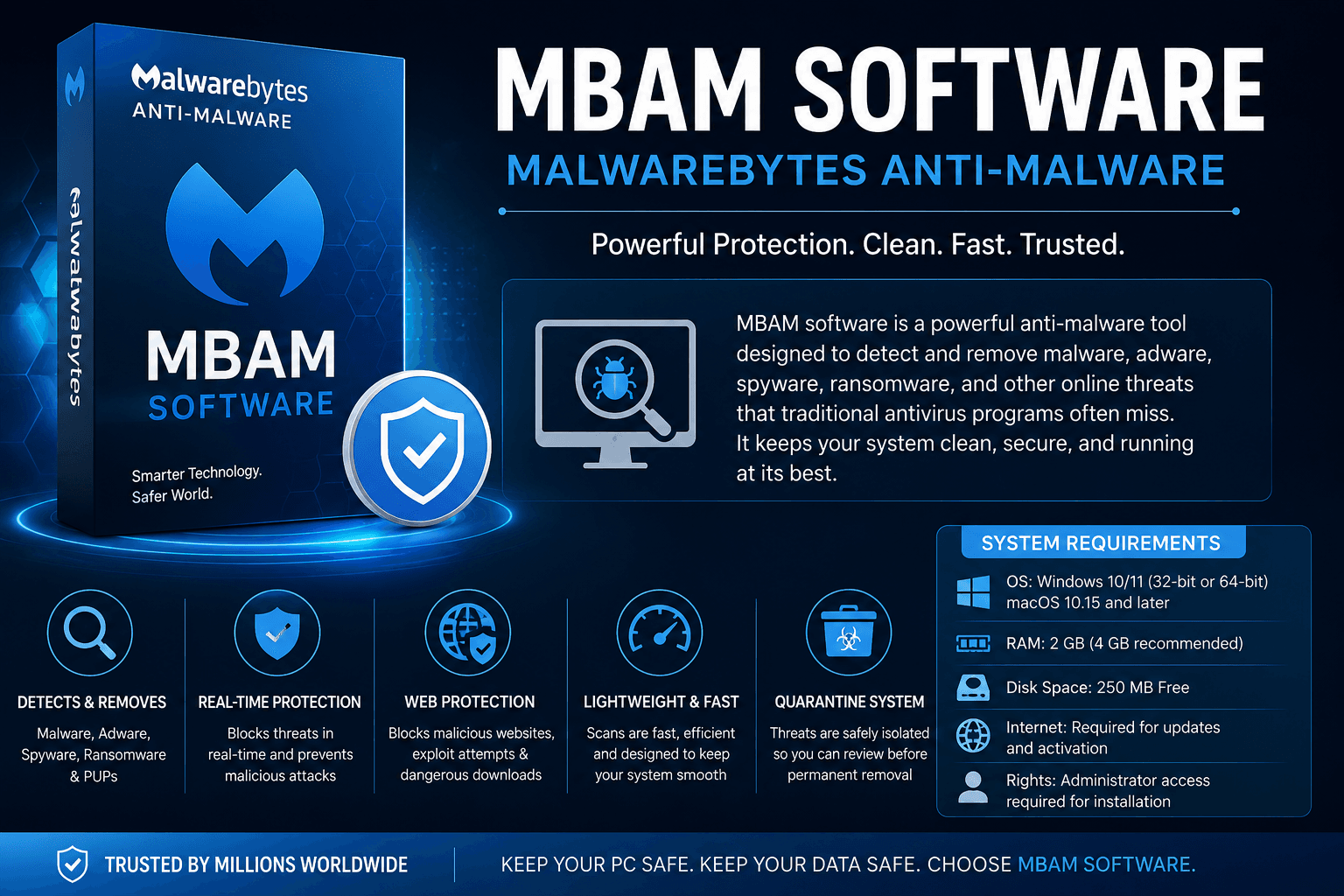
To run the MBAM Software, your system must meet the following requirements:
It is helpful to make sure that a system satisfies the minimum requirements before installing in order to ensure that no problems arise during the scan.
Supported platforms — recent Windows or Mac OS and Android and iOS builds (differentiators)
Random Access Memory — Usually you need at least 2 GB but more will help if you’re running a lot of apps at once.
Free disk space — requires a minimal amount, for the installer, definition updates, and scan logs
Access to the Internet is needed to download the malware definition database and keep it updated.
Administrator rights for setup — required during the setup, because of the need to have deep system access when reading protected sections of the OS, while scanning.Administrator rights for set-up — these privileges will be required when setting up, since the scanner necessitates deep system access while scanning protected sections of the OS.
There are two types of MBAM software, free and premium:MBAM software comes in two forms:
It’s one of the most frequent misunderstandings of first-time users, so there’s no point beating around the bush!
The Free Version
The free edition of MBAM uses the same function, called “on-demand scanner. But there is no continuous background scanning – the software is only likely to run a scan when the user initiates it; the software scans the system, reports on anything suspicious, and sends any identified suspicious objects to a quarantine folder for further investigation.
The Premium Version
Malwarebytes Premium includes the same protections as Malwarebytes Anti-Malware, plus the following: real-time protection, scheduled automatic scans, ransomware protection and the web-filtering layer. This means that MBAM software is more than just a cleanup application and becoming a new, global layer of security running in the background.
why do IT Professionals continue to suggest MBAM Software?
Let’s look at a few reasons why this anti-malware tool has been around for over 10 years and remains a popular suggestion.
It captures the things that are missed. It’s designed to detect malware and PUPs instead of any signatures, so it often detects viruses that other anti-virus solutions miss.
No need to uninstall other security programs. It is made to run in a secondary scanner mode and that means that a technician doesn’t have to disable the current anti-virus software if one exists.
The quarantine system minimizes the potential for damage by accident. Flagged files are not deleted immediately, as they have been isolated first for the user to double-check before anything is deleted from it.
Malwarebytes Anti-Malware: Good and bad points
Effective detection of adware, spyware and PUPs which normal anti-virus software may not detect.
None real-time or scheduled scans in free version
In fact some of the less-expensive scans even offer rootkit scanning.
Having two real-time security solutions that are running simultaneously at times can cause system slowdowns.
Quarantine system: this enables users to review before permanently deleting the objects.
Premium features need to be subscribed to on an ongoing basis
Also supports older antivirus programs.
Premium full protection (web filtering, ransomware protection)
Low weight on full security suites
Some false alarms in routine, unusual programmes.
Cleaning Up the Terminology: MBAM Software, Malware Scanners And Removal Tools
There can be several terms very similar to each other you’ll come across when searching for this topic, so it’s helpful to sort them to look at each one individually.
MBAM acronym is actually Malwarebytes Anti-Malware. MBAM software falls under the category of Malware Removal Tool, which in turn has a number of competitors that provide very similar functionality. The primary functionality is called anti-malware scanner, recognizing a system for nasty files and notifying you of them. The solution more restrictively known as PUP remover is part of what MBAM software does: PUP detection. These similar terms can be confusing, so knowing their meaning will better explain the errors found in the comparisons and why they appear in the MBAM software along with the apps that may be slightly different in name but have similar uses.
The most recent version of MBAM installations and software history are available from this official install listing, that follows the updates to the software releases directly.
Here are some of the most prevalent problems when using MBAM Software.
A few bad habits diminish the effectiveness of this tool in actual use.
Considering it as a complete Antivirus. Especially the free version isn’t designed for ongoing protection, so turning solely to a free anti-virus program is bound to leave on-going gaps that an ongoing protection system is supposed to fill.
Forgetting to carry out manual scans regularly. One of the problems with the free scanner is that people forget to do it on a schedule unless they have it programmed in (a premium feature), which renders the product pretty useless as a cleaning solution.
Not reviewing quarantined items. The point of files being in quarantine is to allow users to review them — a process that allows the user to benefit from a “second read” of files, allowing them to catch any mistaken detection before it is too late!
Just as the businesses think carefully about the tools when assessing a technology insurance company before a technology event occurs, they should take the time to carefully consider a layered approach to protection — using a combination of tools instead of relying on just one.
Frequently Asked Questions
What is the difference between MBAM software and Malwarebytes Premium?
Not exactly. MBAM is used to refer to Malwarebytes Anti-Malware in general, including both the free, on-demand version, and the premium real-time version.
Does MBAM software work with Windows Defender or other antivirus?
Generally yes. Mostly, however, it was designed to be used with existing antivirus on the users’ computers and not as a replacement for their current security software.
How frequently will you use MBAM software for free?
It does not scan automatically, so a weekly or semi-weekly scan (or whenever a system exhibits some strange behavior) might be considered a good routine.
Can MBAM software eliminate Rootkits?
Yes, it has rootkit scanning, as well – functionality that is lacking from less robust malware scanners which would only look at the surface level files.
Does MBAM software work with beginner?
Yes. It’s very simple and intuitive: you can scan, check up on the results, quarantine suspicious files and restore the ones marked as suspicious.
Is MBAM software different to a normal malware removal tool?
The term MBAM software is used to designate the Malwarebytes’ product in particular, and malfunctionware removal tool is used for multiple competing products, all of which serve similar functions as Malwarebytes’ product—those of detecting, removing, and getting rid of malware.
Final Thoughts
Like most reputable security software, MBAM has gained popularity by discovering and intercepting threats that other security programs fail to recognize, but with little training required on its part by its users. With the free scanner scanning from time to time with occasional manual checks as needed, or with the Premium version constantly scanning for malware, you’ll see that for most people, MBAM software is not designed to replace an antivirus package, but rather to be used as part of a layered multipronged solution to ensure a system’s cleanliness.